Multiline Strategies
Kelora can treat clusters of lines as a single event so stack traces, YAML payloads, JSON blobs, and other multi-line records stay intact. This page explains how multiline detection fits into the pipeline and how to pick the right strategy for your data set.
Why Multiline Matters
-
Application errors often spill over multiple lines (Java stack traces, Python tracebacks, Go panics).
-
Structured payloads such as JSON, YAML, or CEF frequently span multiple lines when logged with indentation.
-
Batch systems may wrap related log entries between explicit boundary markers like
BEGIN/END.
Without multiline detection, Kelora parses each physical line as its own event, making it hard to correlate context.
Choosing a Strategy
Start with timestamp if your logs have timestamp prefixes (works for 80% of application logs with stack traces).
Use a language preset (java, python, go) for stack traces in output without reliable timestamps — raw stderr, container stdout, CI logs. If your lines do start with timestamps, prefer timestamp: it also keeps non-stacktrace continuations with their events.
Use indent if continuation lines start with whitespace but the first line doesn't have a timestamp.
Use blank for paragraph-shaped input where blank lines separate records.
Use regex only when you have explicit BEGIN/END markers or need custom boundary detection.
Use all rarely—only for whole-file processing where the entire input is a single logical record.
How Multiline Processing Works
-
Pre-parse stage – Multiline runs before the input parser. The chunker groups input lines into blocks according to the configured strategy.
-
Parsing – The aggregated block is fed into the selected parser (
-f). Use-f rawwhen you want to keep the block exactly as-is, including newlines. -
Downstream pipeline – Filters, exec scripts, and formatters see the aggregated event exactly once.
meta.line_numandmeta.filenamepoint at the event's first physical line.
Boundary guarantees:
- Events never span input files. The buffer is flushed when a new file begins.
- Blank lines are continuations for
timestamp/indent(real stack traces contain them), separators forblank, and ordinary lines forregex. Trailing blank lines are trimmed from each event (allexcepted). - Line filters run before assembly.
--keep-lines/--ignore-linesremove physical lines before the chunker sees them — useful for dropping interleaved noise, but it means a filtered continuation line never reaches the event. To filter whole assembled events, use--filterinstead (kelora prints a one-time hint when you combine them).
Multiline increases per-event memory usage. When processing large files, keep an
eye on chunk size via --stats and consider tuning --batch-size/--batch-timeout
when using --parallel.
Strategy Overview
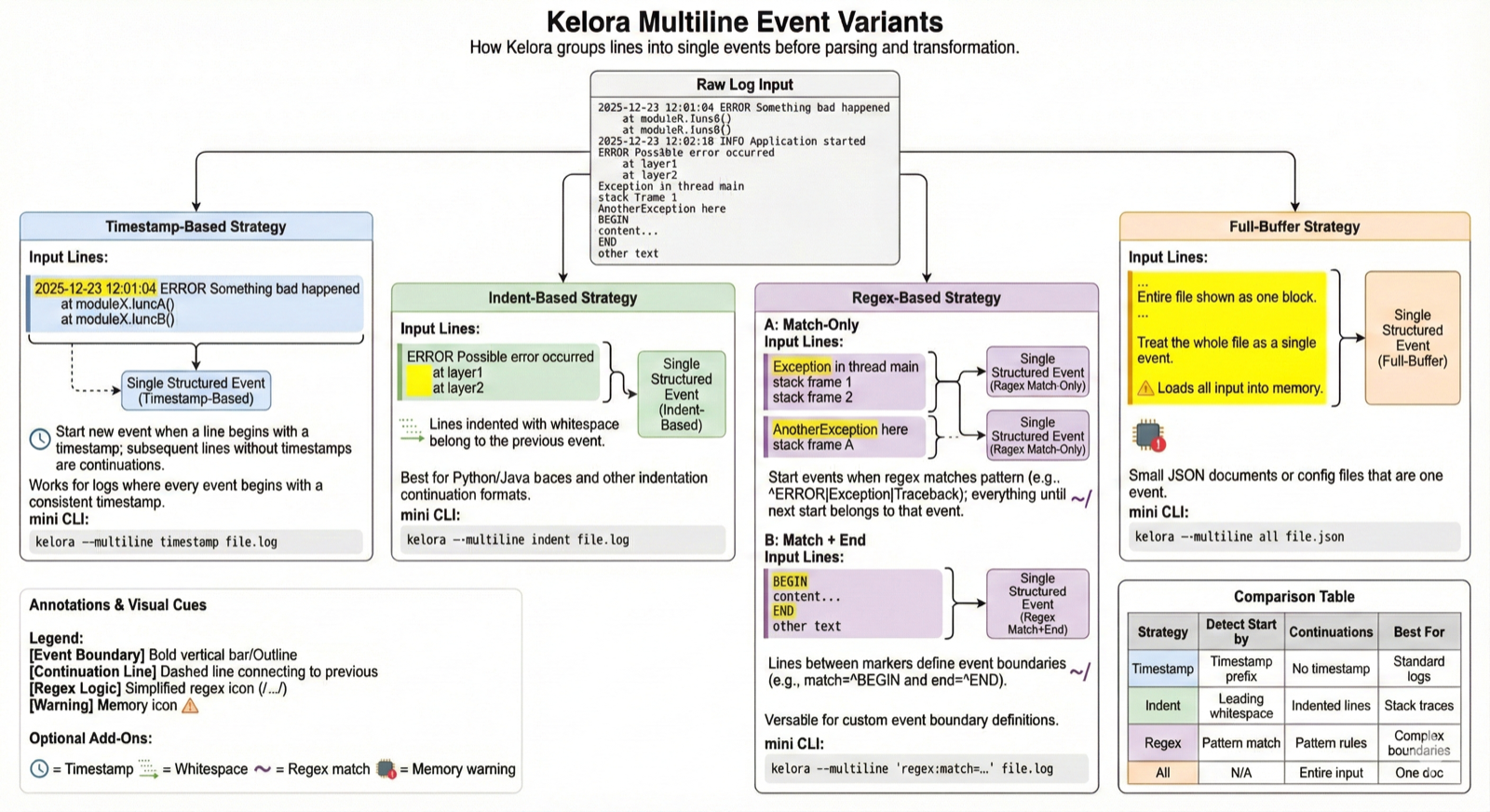
The diagram below illustrates how each multiline strategy groups input lines into structured events. Each strategy detects event boundaries differently—timestamp prefixes, indentation patterns, regex matches, or treating the entire input as one block. Choose the approach that matches your log format.
Built-in Strategies
Kelora ships five general strategies plus three language stack-trace presets. Only one can be active at a time.
1. Timestamp Headers (--multiline timestamp)
Best for logs where each entry begins with a timestamp. Detection uses Kelora's
adaptive timestamp parser and locks onto the first format family it sees:
once your headers match (say) ISO timestamps, a continuation line that merely
starts with something time-like (17:03 was the incident window, an epoch
number, Jan 5 ...) cannot split the event. Two options adjust this:
timestamp:format=<chrono>— detect only this format (the hint is a contract, not a preference).timestamp:loose— accept any recognizable timestamp as a header, for files that genuinely mix formats.
kelora -f raw examples/multiline_stacktrace.log \
  --multiline timestamp --multiline-join=newline \
  --filter 'e.raw.contains("Traceback")' \
  -F json --take 1
{"raw":"2024-01-15 10:01:00 ERROR Failed to process request\nTraceback (most recent call last):\n File \"/app/server.py\", line 42, in handle_request\n result = process_data(request.body)\n File \"/app/processor.py\", line 15, in process_data\n return json.loads(data)\nValueError: Invalid JSON format at line 3"}
The event now contains the full Python traceback with preserved line breaks until the next timestamped
header. Use --multiline-join=newline to keep the stack trace structure intact for display or further processing.
Pair this strategy with --ts-format if you also need chronological filtering later in the pipeline.
2. Indentation Continuations (--multiline indent)
Combine lines that start with leading whitespace. This matches Java stack traces and similar outputs where continuation lines are indented. Blank lines inside a block are continuations too, so a trace with an empty line in the middle stays one event.
In this example the stack trace block remains an atomic event with preserved line breaks.
If the first line of a block is not indented (for example, Traceback ...), combine strategies by
preferring timestamp or switching to regex (see below) so the header line is
included.
3. Regex Boundaries (--multiline regex:match=...[:end=...])
Define explicit start and optional end markers. This is ideal for logs that wrap
records with guard strings such as BEGIN/END or XML tags.
If no end= is provided, a new match= line flushes the previous block. Regex
patterns are Rust regular expressions—the same engine used by --filter.
Patterns may contain literal colons (regex:match=^\d{2}:\d{2} works); only
:match= / :end= act as option separators.
4. Blank-Line Separated Records (--multiline blank)
Paragraph mode: blank lines separate records, and the separator itself belongs
to no record. Handy for reports, SHOW ENGINE INNODB STATUS-style dumps, or
any output that groups related lines into blank-delimited stanzas.
5. Treat Everything as One Event (--multiline all)
This strategy buffers the entire stream and emits it as a single event. Useful for one-off conversions (for example piping a whole JSON array into a script). Use with care: the entire input must fit in memory.
6. Language Stack-Trace Presets (--multiline java|python|go)
Say what your logs contain instead of describing boundaries. Each preset is a
small state machine over the language's real trace shape — the approach Fluent
Bit's built-in multiline parsers use — aimed at output without reliable
timestamps: raw stderr, container stdout, CI logs. There, no other strategy
works: timestamp has nothing to lock onto, indent splits on the unindented
lines every real trace pivots on (Python's final ValueError: ..., Java's
Caused by:, Go's goroutine N [running]:), and regex:match= has the
inverse semantics (everything between matches becomes one event).
Under a preset, every line is its own event unless it is a recognized trace
line. A trace start attaches to the line that logged it — so a
logger.exception(...) header keeps its traceback — and continuations extend
the event:
java— a dotted exception line (optionallyException in thread "..."),at ...frames,Caused by:/Suppressed:chains,... N more. An exception class whose name lacksException/Error/Throwableis caught from its first indented frame.python—Traceback (most recent call last):, indented frames and source lines, the final exception line (dotted name, bareKeyboardInterruptincluded), chained-exception bridges (During handling of .../The above exception ...), exception groups (3.11+), and header-lessSyntaxErrorblocks.go—panic:/fatal error:/http: panic serving, the[signal ...]line, goroutine headers, call/location pairs,created by ..., and the blank lines between goroutine blocks, so a full dump stays one event; standalone SIGQUIT goroutine dumps group too.
Presets default to --multiline-join=newline — their whole point is stack
traces, which space-joining destroys.
On timestamped input, presets are safe but not optimal. A line starting
with a timestamp (same lock-in as the timestamp strategy) always begins a
new event, overriding any trace rule, so a preset can never bleed a trace
across a real event boundary. But timestamp groups any continuation line
— wrapped messages, embedded payloads — not just recognized trace shapes, so
kelora hints once when a preset keeps meeting timestamped headers. Known
limits, accepted by design: a multi-line exception message (a
str(e)/getMessage() containing newlines) is not recognized past its first
line, and the losslessness guarantee still holds — an unrecognized trace shape
degrades to split events, never to dropped lines.
Controlling Line Joining
By default, --multiline joins grouped lines with spaces — except all and
the language presets (java/python/go), which default to newline so
buffered files and stack traces keep their structure.
To preserve the original line structure in stack traces or other multi-line content:
--multiline-join=newline   # Preserve line breaks (use for stack traces, logs with continuations)
--multiline-join=space     # Join with spaces (default, good for simple log continuation)
--multiline-join=empty     # Concatenate directly (no separator)
When to use newline: If you need to split("\n") the multiline block, count lines, or preserve formatting for display.
When to use space: When line breaks are not semantically important and you want a compact single-line representation.
All three joins produce the same events — only the text inside the event differs.
In the regex-based line formats (the auto-detected application-log patterns,
-f regex:...) and in -f syslog, the trailing message capture spans the
newlines that newline inserts, so a stack trace lands in the message field
with its line structure intact.
Choosing the Right Parser
-
-f rawstores the entire aggregated block in therawfield without further processing. Use this when you want to preserve all text exactly as grouped (combine with--multiline-join=newlineif you need to preserve line breaks). -
Structured parsers (
-f json,-f logfmt,-f cols:...,-f combined) expect a single logical record. Use multiline to restore that logical record before parsing.If the assembled block is not one record — a
key=valueline followed by stack frames, say — the parser fails and the whole event is dropped, so turning multiline on can leave you with fewer events than leaving it off. No--multiline-joinvalue avoids this: a stack frame is notkey=valueunder any separator. kelora hints at the multiline settings when a parse error lands on a grouped event, so a run that reportsKey cannot contain spacesalso names the real lever. To keep the continuation lines, use a parser that accepts free text —-f raw,-f line, or a-f regex:...pattern whose trailing capture spans newlines (-f syslogand the built-in application-log patterns already do). -
After parsing, you can still keep the original text by copying the aggregated block into another field inside an exec script.
Streams, Timeouts, and Safety Caps
Two flags bound the buffer's behavior:
-
--multiline-timeout DURATION— when input goes quiet with a partial event buffered, flush it after this long (e.g.400ms,2s;0= never). The default depends on the input: off for regular files, where lines arrive at pipeline speed and an early flush could only split an event, so file runs are deterministic; 400ms for streams (stdin, FIFOs), sotail -f | kelorashows events promptly. When a defaulted stream flush fires, kelora prints a one-time hint — if a slow writer's events appear split, raise the timeout or set0. -
--multiline-max-lines N— split an event after N buffered lines and warn once (default: 10000,0= unlimited). This is the safety net for aregex:match=that never matches again: instead of silently buffering the entire input, kelora flushes and tells you.--multiline allis exempt — buffering everything is its purpose.
When nothing splits at all
The line cap only engages above its 10000-line default, so on an ordinary file
a boundary rule that never matches used to be completely silent: one event, no
errors, exit 0. kelora now hints once at end of input when the rule never
matched any line, naming the premise that failed:
$ kelora app.log --multiline regex:match='^NEVERMATCHES'
kelora hint: multiline 'regex': the start pattern '^NEVERMATCHES' never matched,
so nothing split the input into separate events — check the pattern
(see --help-multiline)
The common causes are a typo'd regex:match=, timestamp on a file whose
lines carry their timestamp inside the record rather than at column 0 ({"ts":
…, ts=…, [2024-07-14 …]), blank on input with no blank lines, and
indent where every line is indented.
Two strategies are exempt, because finding no boundary is not a mistake for
them: all is asked for exactly one event, and a language preset legitimately
reports none when the whole input is a single stack trace (a piped crash dump).
The hint is advisory — --no-hints, --no-diagnostics, --silent, or
KELORA_NO_HINTS silence it, and like other hints it is hushed in data-only
modes (-s, -m, …) unless you pass --hints.
Note that this catches only the total collapse. A strategy that finds some
boundaries but far fewer than the input has records — timestamp on a
mixed-format capture where only a minority of lines lead with a timestamp — is
still silent; -s is the way to spot it, by comparing Lines processed with
Events created.
Observability and Debugging
-
Run with
--statsor-sto see how many events were emitted after chunking. A sudden drop or spike indicates the strategy might be too broad or too narrow. -
Use
--takewhile experimenting so you do not print massive aggregates to the terminal. -
Inspect the aggregated text with
-f raw -F jsonduring tuning to confirm the block boundaries look correct.
Advanced Tips
-
Custom timestamp formats:
--multiline 'timestamp:format=%d/%b/%Y:%H:%M:%S %z'mirrors Apache/Nginx access log headers. -
Prefix extraction: When container runtimes prepend metadata, run
--extract-prefixbefore multiline so the separator line is preserved. -
Parallel mode: With
--parallel, tune--batch-sizeand--batch-timeoutif you have extremely large blocks to prevent workers from buffering too much at once. -
Fallback for JSON/YAML: Complex nested documents may require
regexboundaries or pre-processing (for example,jq) because closing braces often return to column zero, breaking theindentheuristic.
Troubleshooting
-
Strategy misfires: If you see every line printed individually, your start detector did not trigger. Try
--multiline regexwith an explicit pattern, or switch totimestampwith a format hint. -
A preset splits a trace it should recognize: presets match the language's standard trace shapes; unusual output (a multi-line exception message, a custom formatter) can fall outside them. Inspect the boundary with
-f raw -F json --take 5; if the shape is genuinely standard, that is a preset gap worth reporting.regex:match=remains the escape hatch. -
Fewer events with multiline than without: the grouped block no longer parses as the chosen format, so each failing event is dropped. The parse error names a symptom (
Key cannot contain spaces,Invalid combined log format) and the hint beside it names the cause. See Choosing the Right Parser. -
Events merge that should split: with
timestamp, lock-in may have latched onto the wrong format if the file's first line looks time-like but isn't a real header. Pin the format withtimestamp:format=...or disable locking withtimestamp:loose. -
Events split on a live stream: a pause longer than the idle timeout flushes the buffered event. Raise
--multiline-timeout(or0to never flush early). -
Truncated blocks: For JSON or YAML, remember that closing braces/brackets often start at column zero. Use regex boundaries that match
^}or^\]to keep the termination line. -
Out-of-memory risk:
--multiline allaccumulates the entire input by design. For the other strategies,--multiline-max-lines(default 10000) caps runaway buffering from a never-matching pattern and warns when it splits. -
Context flags:
-A/-B/-Crequire a sliding window. If you combine context with multiline, increase--windowso the context has enough buffered events.
Related Reading
-
Pipeline Model – see where multiline sits relative to parsing and transformation.
-
Reference: CLI Options – full flag syntax for
--multiline,--extract-prefix, and timestamp controls. -
Tutorial: Parsing Custom Formats – practical recipes that often start with multiline normalization.