CLI Reference
Complete command-line interface reference for Kelora. For quick start examples, see the Quickstart Guide.
Synopsis
Processing Modes
Kelora supports two processing modes:
| Mode | When to Use | Characteristics |
|---|---|---|
| Sequential (default) | Streaming, interactive, ordered output | Events processed one at a time in order |
Parallel (--parallel) |
High-throughput batch processing | Events processed in parallel batches across cores |
Common Examples
# Find errors in access logs
kelora access.log --levels error,critical

# Transform JSON logs with Rhai
kelora -j app.json --exec 'e.duration_ms = e.end_time - e.start_time'

# Extract specific fields from NGINX logs
kelora nginx.log -f combined --keys method,status,path
Arguments
Files
Input files to process. If omitted, reads from stdin. Use - to explicitly specify stdin.
Examples:
kelora app.log                    # Single file
kelora logs/*.jsonl               # Multiple files with glob
kelora file1.log file2.log        # Multiple files explicit
tail -f app.log | kelora -j       # From stdin
kelora -                          # Explicitly read stdin
Global Options
Help and Version
| Flag | Description |
|---|---|
-h, --help |
Print complete help (use -h for summary) |
--help [KEYWORD] |
Search the full CLI reference; pass a flag (--help -j, --help --since) for a precise whole-token match, or a bare word (--help time) for a substring search |
-V, --version |
Print version information |
Help Topics
| Flag | Description |
|---|---|
--help-rhai |
Rhai scripting guide and stage semantics |
--help-functions [KEYWORD] |
All 150+ built-in Rhai functions; add a KEYWORD to filter by name/description (e.g. --help-functions ip) |
--help-examples |
Practical log analysis patterns |
--help-time |
Timestamp format reference (chrono format strings) |
--help-multiline |
Multi-line event detection strategies |
--completions <SHELL> |
Generate shell completion script (bash, zsh, fish, powershell, elvish) |
Shell Completions
--completions <SHELL>
Generate shell completion script for tab-completion of flags and options.
Supported shells: bash, zsh, fish, powershell, elvish
Installation:
# Bash
mkdir -p ~/.local/share/bash-completion/completions
kelora --completions bash > ~/.local/share/bash-completion/completions/kelora

# Zsh
mkdir -p ~/.zfunc
kelora --completions zsh > ~/.zfunc/_kelora
# Add ~/.zfunc to fpath in ~/.zshrc, then run: autoload -Uz compinit && compinit

# Fish
mkdir -p ~/.config/fish/completions
kelora --completions fish > ~/.config/fish/completions/kelora.fish

# PowerShell (add to $PROFILE)
kelora --completions powershell >> $PROFILE
After installation, restart your shell or reload its completion configuration. Tab completion will work for all flags and enum values (formats, shells, etc.).
Input Options
Format Selection
-f, --input-format <FORMAT>
Specify input format. Supports standard formats, column parsing, and CSV with type annotations.
Standard Formats:
auto- Auto-detect format (default): from the first non-empty line on stdin, from a sample of the file head on files (mixed-format files get a cascade automatically)auto-per-file- Auto-detect once per file; useful when different files use different formatsjson- JSON lines (one JSON object per line)line- Plain text (one line per event)csv- CSV with header rowtsv- Tab-separated values with headerlogfmt- Key-value pairs (logfmt format)syslog- Syslog RFC5424 and RFC3164combined- Apache/Nginx log formats (Common + Combined)cef- ArcSight Common Event Format
Column Parsing:
CSV with Types:
Cascade mode (mixed-format streams):
Comma-separated list of simple formats tried in order; first success wins.
Adds an _format field to each event with the winning parser name, unless the
record already carries its own _format (that value is kept). Allowed:
json, line, raw, logfmt, syslog, cef, combined. Schema-based
formats (csv/tsv, cols:, regex:) and auto are not allowed inside
the cascade list. See Format Reference for full
details.
Examples:
kelora -f json app.log
kelora -f auto-per-file -J logs/*.log         # detect each file independently
kelora -f combined nginx.log
kelora -f json,line noisy.log                  # cascade: JSON with text fallback
kelora -f 'cols:ts(2) level *msg' custom.log   # `ts` is auto-detected as a timestamp
-j
Shortcut for -f json. Only affects input parsing. For JSON output, use -J or -F json.
File Processing
--file-order <FILE_ORDER>
Control file processing order.
Values:
cli- Process files in command-line order (default)name- Sort files alphabetically by namemtime- Sort files by modification time (oldest first)
--merge-sorted
Merge multiple already-sorted input files into one chronological stream.
Kelora does this as a streaming k-way merge: it keeps one pending event per input file and emits the earliest timestamp currently visible. This is fast and memory-bounded, but it is not a full global sort.
Use --merge-sorted when:
- Each input file is already in chronological order on its own
- You want one merged timeline across rotated shards, hosts, or services
- The dataset is too large to sort as a separate pre-processing step
Do not expect --merge-sorted to repair disorder within a file. If one file
contains 10:04 followed later by 10:01, Kelora aborts as soon as it
discovers that out-of-order event.
Before emitting output, Kelora must find one timestamped event in every input
file. Missing timestamps, merge-time parse failures, and per-file disorder are
always fatal because they would break the chronological output guarantee. If
your timestamps live in a non-standard field, specify it explicitly with
--ts-field <field>.
Output remains streamed. If a late merge error occurs after some events were already emitted, that prefix remains valid and the command exits non-zero.
Practical examples:
- Merge per-host files collected over the same time range
- Reconstruct one timeline from hourly or daily shards that were written in order
- Combine app, proxy, and worker logs when each source is already ordered
Current constraints:
- Requires a concrete input format after auto-detection; use
-jor-f logfmtwhen needed - Not supported with
--parallelor manual thread overrides - Not yet supported for CSV/TSV inputs
See Merge Sorted Files by Timestamp for a full walkthrough and tradeoff discussion.
Line Filtering
--skip-lines <N>
Skip the first N input lines.
--keep-lines <REGEX>
Keep only input lines matching regex pattern (applied before --ignore-lines).
--ignore-lines <REGEX>
Ignore input lines matching regex pattern.
Section Selection
Process specific sections of log files with multiple logical sections.
--section-from <REGEX>
Start emitting a section from the line that matches (inclusive). Without a stop flag, processing continues until EOF or the next occurrence of the start pattern.
--section-after <REGEX>
Begin the section after the matching line (exclusive start). Useful when headers are just markers.
--section-before <REGEX>
Stop the section when the regex matches (exclusive end). This mirrors the previous --section-end behavior.
--section-through <REGEX>
Stop only after emitting the matching line (inclusive end). Handy when the footer carries status information.
--max-sections <N>
Maximum number of sections to process. Default: -1 (unlimited).
# Process first 2 sections
kelora --section-from '^== ' --max-sections 2 system.log

# Process only first section
kelora --section-from '^Session' --section-before '^End' --max-sections 1 app.log
Processing Order:
Section selection runs early in the pipeline, before --keep-lines and --ignore-lines:
--skip-lines- Skip first N lines--section-from/after/before/through- Select sections--keep-lines- Keep matching lines within sections--ignore-lines- Ignore matching lines within sections-M/--multiline- Group lines into events- Parsing - Parse into structured events
Use Cases:
# Extract specific service logs from docker-compose output
docker compose logs | kelora --section-from '^web_1' --section-before '^(db_1|api_1)' -f line

# Process first 3 user sessions
kelora --section-from 'User .* logged in' --section-through 'logged out' --max-sections 3 app.log

# Extract iked section, then filter for errors
kelora --section-after '^== iked' --section-before '^==' --keep-lines 'ERROR' system.log
Performance:
- Section selection is single-threaded (even with
--parallel) - Minimal overhead - just regex matching per line
- Heavy processing (parsing, filtering, Rhai) still parallelizes
- No full-file buffering - processes line-by-line
Timestamp Configuration
--ts-field <FIELD>
Custom timestamp field name for parsing. When set, Kelora only inspects that field; the built-in fallbacks are disabled so missing or malformed values stay visible in stats and diagnostics.
--ts-format <FORMAT>
Custom timestamp format using chrono format strings. See --help-time for format reference.
--input-tz <TIMEZONE>
Timezone for naive input timestamps (without timezone info). Default: UTC.
Values:
UTC- Coordinated Universal Timelocal- System local time- Named timezones:
Europe/Berlin,America/New_York, etc.
--input-year <YEAR>
Year for year-less input timestamps (syslog's Jan 15 14:30:45, glog, redis, …).
Default: auto.
Values:
YYYY- a 4-digit year (1000-9999); every year-less timestamp resolves into itauto- guess between last year, this year and next year, keeping the candidate nearest the current clock (the default; also accepted explicitly, so a CLI run can override an.kelora.inidefault)
Without this option kelora guesses, warns that it guessed, and dates an archived
log to the current year — which shifts --since/--until, --span boundaries
and --merge-sorted ordering along with it. Supplying the year silences the
warning because nothing was inferred.
kelora --input-year 2005 Linux_2k.log
kelora --input-year 2005 --since 2005-06-01 --until 2005-07-01 Linux_2k.log
The year is stated once per run, not tracked per line, so an input that crosses a
year boundary still needs auto: with --input-year 2005, a December-to-January
log dates its January lines to January 2005 rather than 2006. --merge-sorted
rejects the result as unsorted rather than merging it silently.
Multi-line Events
-M, --multiline <STRATEGY>
Multi-line event detection strategy. Value format: <strategy>[:key=value[:key=value...]]. Supported strategies:
timestamp— a line beginning with a timestamp starts a new event. Detection locks onto the first format family it sees, so other time-like prefixes on continuation lines cannot split an event. Options:format=pins the header format exclusively (e.g.,timestamp:format=%Y-%m-%d %H:%M:%S);looseaccepts any recognizable timestamp (mixed-format files).indent— indented and blank lines continue the current event.blank— blank lines separate events (paragraph mode).regex— requiresmatch=REGEX, optionalend=REGEX.all— entire input as one event.
Option values may contain literal colons; only :match= / :end= /
:format= / :loose act as separators.
Events never span input files, and meta.line_num/meta.filename point at
each event's first physical line.
kelora -M all config.json                        # Entire input as one event
kelora -M timestamp app.log                      # Auto-detect timestamp headers
kelora -M 'timestamp:format=%Y-%m-%d %H:%M:%S' app.log
kelora -M blank report.txt                       # Blank-line separated records
kelora -M 'regex:match=^\\d{4}-' app.log         # Start pattern only
kelora -M 'regex:match=^START:end=^END$' app.log # Start + end patterns
--multiline-join <MODE>
Join multiline lines with the specified separator. Default: space
(newline for --multiline all).
Values:
space- Replace line breaks with spaces (legacy behavior)newline- Preserve line breaks between linesempty- Concatenate lines directly
--multiline-timeout <DURATION>
Flush a buffered partial event after this much input inactivity (e.g.
400ms, 2s; 0 = never). Default: off when every input is a regular file
(file runs stay deterministic), 400ms when reading a stream (stdin, FIFO)
so tail -f | kelora shows events promptly. When a defaulted stream flush
fires, kelora prints a one-time hint.
--multiline-max-lines <N>
Split a multiline event after N buffered lines and warn once (safety cap
against a never-matching pattern buffering the whole input). Default:
10000; 0 = unlimited. Ignored by --multiline all.
Prefix Extraction
--extract-prefix <FIELD>
Extract text before separator to specified field (runs before parsing).
--prefix-sep <STRING>
Separator string for prefix extraction. Default: |
Column Format Options
--cols-sep <SEPARATOR>
Column separator for cols:<spec> format. Default: whitespace.
Processing Options
Scripting Stages
--begin <SCRIPT>
Run Rhai script once before processing any events. Typical use: initialize lookup tables or shared context in the global conf map.
Available helpers:
read_lines(path)- Read file as array of linesread_file(path)- Read file as string
--filter <EXPRESSION>
Boolean filter expression. Events where expression returns true are kept. Multiple filters are combined with AND logic.
Can be combined with --include to call helper functions defined in a Rhai
library. When --include is used with --filter, the included file must
contain only function definitions; top-level statements are rejected.
kelora -j --filter 'e.status >= 400' app.log
kelora -j -l error --filter 'e.service == "api"' app.log   # Use -l for level filtering (faster than Rhai)
kelora -j -I helpers.rhai --filter 'is_error(e.level)' app.log
-e, --exec <SCRIPT>
Transform/process script evaluated on each event. Multiple --exec scripts run in order.
kelora -j --exec 'e.duration_s = e.duration_ms / 1000' app.log
kelora -j --exec 'track_freq("service", e.service)' app.log
-E, --exec-file <FILE>
Execute Rhai script from file (runs in exec stage).
--assert <EXPRESSION>
Validate events against boolean expressions. Events are always emitted (unlike --filter which drops non-matching events), but violations are reported to stderr. Multiple assertions can be specified and all are checked. Exit code 1 if any assertions fail.
Use Cases:
- Validate required fields exist
- Enforce data quality rules
- Check invariants during processing
- Verify transformations are correct
# Ensure all events have user_id
kelora -j app.log --assert 'e.has("user_id")'

# Validate field after transformation
kelora -j data.log \
    --exec 'e.x = e.x.lower()' \
    --assert 'e.x == e.x.lower()'

# Multiple assertions (all checked)
kelora -j app.log \
    --assert 'e.has("timestamp")' \
    --assert 'e.level.is_string()' \
    --assert 'e.status >= 0'
Behavior:
- Events always pass through to output (assertions don't filter)
- Violations reported immediately to stderr:
assert failed: <expr> - Processing continues unless
--strictis enabled - Exit code 1 if any assertions fail
- Per-expression failure counts shown in
--stats
With --strict:
Note: Like --filter, assertions must be pure boolean expressions (no includes supported).
-I, --include <FILE>
Include Rhai files before script stages (library imports).
Placement on the command line determines which stage the file applies to:
- Before
--exec/-e- loaded into that exec stage - Before
--filter- loaded into that filter stage - Before all script stages - loaded into the begin stage
When used with --filter, the included file must contain only function
definitions; top-level statements are rejected.
kelora -j -I helpers.rhai --exec 'e.custom = my_helper(e)' app.log
kelora -j -I helpers.rhai --filter 'is_error(e.level)' app.log
--end <SCRIPT>
Run once after processing completes (post-processing stage). Access global metrics map from track_*() calls here.
kelora -j \
    --exec 'track_freq("service", e.service)' \
    --end 'print("Total services: " + metrics.len())' \
    app.log
Span Aggregation
--span <N | DURATION | FIELD>
Group events into non-overlapping spans before running a span-close hook. Sequential mode is required (Kelora prints a warning and falls back to sequential if --parallel is also supplied).
--span <N>– Count-based spans. Close after every N events that survive all filters. Example:--span 500.--span <DURATION>– Time-based spans aligned to the events' canonical timestamp (ts). The first event with a validtsanchors fixed windows such as1m,5m,30s,1h.--span <FIELD>– Field-based spans. Open a new span whenever the field value changes. With the single-active-span model, interleaved IDs (req-1, req-2, req-1) produce multiple spans per ID.
How it works:
- Per-event scripts still run for every event.
- Events missing a timestamp (time mode) are marked
meta.span_status == "unassigned"and excluded from the span buffer. - Events with timestamps that fall into an already-closed window are emitted immediately with
meta.span_status == "late". Closed spans are never reopened. - Count spans keep buffered events in memory until the span closes. Kelora warns when
N > 100_000. - Field spans continue the current span when the field is missing (error with
--strict).
--span-idle <DURATION>
Close spans after a period of inactivity (no events). Requires timestamps and cannot be combined with --span.
- Opens a span on the first event with a timestamp; closes when the forward gap between events exceeds the timeout.
- Span IDs use
idle-#<seq>-<start_timestamp>. - Missing timestamps: tagged
unassigned(errors with--strict). - Interleaved/out-of-order events do not close spans; only forward-time gaps are considered. Sort input if you need strict wall-clock ordering.
--span-summary[=text|tsv|json]
Emit one rollup row per closed span, with no script. Requires --span or --span-idle (exit code 2 otherwise). Implies -q/--quiet: you asked for the rollup, so the rollup is the data.
Each row carries three things:
| Element | Source |
|---|---|
| label | span.start as RFC3339 seconds (Z) when the mode has one, else span.id — #0 for count spans, the field value for field spans |
events |
Number of events that survived filters and were included |
| metrics | Every key of span.metrics — additive aggregators only, including those synthesized by --freq/--describe/--card |
Formats:
text— one line per span,key=valuepairs. Nested metrics flatten with a dot, matchingget_path's convention:level.INFO=2.tsv— long/tidylabel<TAB>metric<TAB>key<TAB>valuerecords, one per value, with an empty key column for scalars. This is the cumulative metrics TSV shape with the label prepended. Long form is deliberate:span.metricsomits zero deltas, so a wide table would jitter its columns between spans.json— one object per line:{"span":…,"start":…,"end":…,"events":…,"metrics":{…}}.start/endare omitted for count and field spans, which have none.- Bare
--span-summaryauto-selectstexton a terminal andtsvwhen piped or redirected, the same rule as-m. Note the=:--span-summary=tsv(a space is read as a filename).
kelora app.log --span 1m --span-summary                 # events per minute
kelora app.log -l error --span 5m --span-summary        # errors per 5 minutes
kelora app.log --span 1m --freq level --span-summary    # per-minute level breakdown
kelora app.log --span-idle 5m --span-summary            # session sizes
kelora app.log --span 1m --span-summary=tsv | duckdb    # time series out
Interactions:
- Rows are data, not script output.
--no-script-output,-m, and the implied event suppression leave them alone. Only--silentremoves them. - The implied
-myields. With--freq/--describe/--card, their deltas land in each row and the cumulative table is suppressed. An explicit-m/--metrics=FMTstill prints that table, after the rows — explicit beats implied. - Composes with
--span-close. Both run: the hook first, then the row. The hook'sprintreaches stdout normally, which it does not under-m/--freq. - Rows are sparse. A window with no events produces no row; empty windows are not emitted as zeroes. When plotting a time series, fill the gaps downstream or a line chart will read flat where it was zero.
- Sequential only. Like every
--spanmode, this disables parallel processing.
Diagnostics, each fired only when the run is actually affected:
- Events that arrived after their window closed belong to no span, so the rows under-count; the tally is reported once at the end.
- Events with no usable timestamp cannot be placed in a time or idle window, which is why an otherwise-valid run can print nothing at all.
- A field span whose label repeats means interleaved values split into a row per contiguous run, not a row per distinct value.
--describe's non-additive metrics (min/max/percentiles) have no per-window value; they are named once as a set rather than one line per key.
--span-close <SCRIPT>
Run a Rhai snippet once whenever a span closes. Use it to emit per-span summaries, metrics, or rollups. The script runs after the event that triggered the close finishes all per-event stages (filters, execs, etc.).
Read-only span object available inside --span-close:
span.id– Unique span identifier (#0,2024-05-19T12:00:00Z/5m, etc.)span.start/span.end– Half-open window bounds for time-based spans (count spans return())span.label–span.startas RFC3339 seconds when the mode has one, elsespan.id. The same rule--span-summarylabels rows by, so a hook need not branch on the span mode.span.size– Number of events that survived filters and were included in this spanspan.events– Array of events in arrival order (each map includesspan_status,span_start, etc.)span.metrics– Map of per-window values from additivetrack_*calls (count,sum,avg,unique,bucket); non-additive aggregators (min,max,percentiles,cardinality,top,bottom) are omitted with a warning — usespan.eventsfor thosespan.metric(name)– One metric's per-window value, or0when the window produced none. Accepts a dotted path (span.metric("level.ERROR")). Prefer this overspan.metrics.get_path(name, 0): zero deltas are omitted from the map, so a bare lookup yields()and arithmetic on it fails.
Metadata added to meta during per-event stages:
meta.parsed_ts– Parsed UTC timestamp before any--filter/--execscripts (or()when absent)meta.span_status–"included","late","unassigned", or"filtered"meta.span_id– Span identifier (nullfor unassigned events)meta.span_start,meta.span_end– Boundaries as DateTime values (or()when not applicable)
Kelora cleans up span state automatically when processing completes or on graceful shutdown.
File System Access
--allow-fs-writes
Allow Rhai scripts to create directories and write files. Required for file helpers like append_file() or mkdir().
Window Functions
--window <SIZE>
Enable sliding window of N+1 recent events. The window is exposed as the window array, so you can call helpers like window.pluck().
Timestamp Conversion
--normalize-ts
Normalize the primary timestamp field (the one Kelora uses for filtering and stats) to RFC3339 (ISO 8601). Runs after Rhai scripts and affects every output formatter.
Error Handling Options
Strict Mode
--strict
Exit on first error (fail-fast behavior). Parsing errors, filter errors, or exec errors will immediately abort processing.
--no-strict
Disable strict mode explicitly (resilient mode is default).
Verbosity
-v, --verbose
Show detailed error information. Use multiple times for more verbosity: -v, -vv, -vvv.
Output/Quiet Controls
-q / --quiet
Suppress formatter output (events). Diagnostics, stats, metrics, and script output remain unless further flags are used.
kelora -q app.log                         # No events, diagnostics still emit
kelora -s app.log                         # Stats only (events suppressed automatically)
kelora -m app.log                         # Metrics only (events suppressed automatically)
--diagnostics / --no-diagnostics
Enable or suppress diagnostics and error summaries. By default, diagnostics are enabled. Use --diagnostics to override a --no-diagnostics setting from your config file.
kelora -q --no-diagnostics app.log        # No events, no diagnostics
kelora --diagnostics app.log              # Override config default
Note: When both flags are present, the last one wins. A single fatal line is still emitted on errors even with --no-diagnostics.
--silent / --no-silent
Suppress pipeline emitters on stdout/stderr (events, diagnostics, stats, terminal metrics). Script output stays enabled unless you also use --no-script-output or data-only modes. Metrics files still write. A single fatal line is emitted on errors. --no-silent disables a silent default from config.
--script-output / --no-script-output
Enable or suppress Rhai print/eprint and side-effect warnings. By default, script output is enabled. Use --script-output to override a --no-script-output setting from your config file.
kelora --no-script-output app.log         # Suppress script prints
kelora --script-output app.log            # Override config default
Note: When both flags are present, the last one wins. --no-script-output is implied by data-only modes (-s, -m without --with-* flags).
Filtering Options
Level Filtering
-l, --levels <LEVELS>
Include only events with specified log levels (case-insensitive). Every occurrence runs exactly where it appears in the CLI, so you can place -l before heavy --exec stages (to prune work early) or repeat it later after you derive a new level.
kelora -j --levels error app.log
kelora -j --levels error,warn,critical app.log
kelora -j --exec 'if !e.has("level") { e.level = "WARN" }' --levels warn log.txt  # Add level, then filter
-L, --exclude-levels <LEVELS>
Exclude events with specified log levels (case-insensitive). Like --levels, you may repeat this flag to drop different levels at multiple points in the pipeline.
kelora -j --exclude-levels debug,trace app.log
kelora -j --levels error --exec 'if e.service == "chat" { e.level = "WARN" }' \
    --exclude-levels warn app.log
Field Selection
-k, --keys <FIELDS>
Output only specified top-level fields (comma-separated list).
-K, --exclude-keys <FIELDS>
Exclude specified fields from output (comma-separated list).
Time Range Filtering
--since <TIME>
Include events from this time onward. Accepts journalctl-style timestamps.
Formats:
- Absolute:
2024-01-15T12:00:00Z,2024-01-15 12:00,10:30:00 - Relative:
1h,-30m,yesterday,now,today - Anchored:
end+1h,end-30m(relative to--untilvalue)
kelora -j --since '1 hour ago' app.log
kelora -j --since yesterday app.log
kelora -j --since 2024-01-15T10:00:00Z app.log

# Duration before end time
kelora -j --since "end-1h" --until "11:00" app.log
See Also: Time Reference for complete timestamp syntax.
--until <TIME>
Include events until this time. Accepts journalctl-style timestamps.
Formats:
- Absolute:
2024-01-15T12:00:00Z,2024-01-15 12:00,18:00:00 - Relative:
1h,+30m,tomorrow,now - Anchored:
start+30m,start-1h(relative to--sincevalue)
kelora -j --until '30 minutes ago' app.log
kelora -j --until tomorrow app.log
kelora -j --until 2024-01-15T18:00:00Z app.log

# Duration after start time
kelora -j --since "10:00" --until "start+30m" app.log
Anchored Timestamp Examples:
Anchor one boundary to the other for duration-based windows:
# 30 minutes starting at 10:00
kelora --since "10:00" --until "start+30m" app.log

# 1 hour ending at 11:00
kelora --since "end-1h" --until "11:00" app.log

# 2 hours starting from yesterday
kelora --since "yesterday" --until "start+2h" app.log
Important: Cannot use both anchors in the same command (e.g., --since end-1h --until start+1h is an error).
See Also: Time Reference for complete timestamp syntax.
Output Limiting
-n, --take <N>
Limit output to the first N events (after filtering).
Context Lines
-B, --before-context <N>
Show N events before each match (requires filtering with --filter, --levels/--exclude-levels, or --since/--until).
-A, --after-context <N>
Show N events after each match (requires filtering).
-C, --context <N>
Show N events before and after each match, like grep -C (requires filtering).
Visual Example:
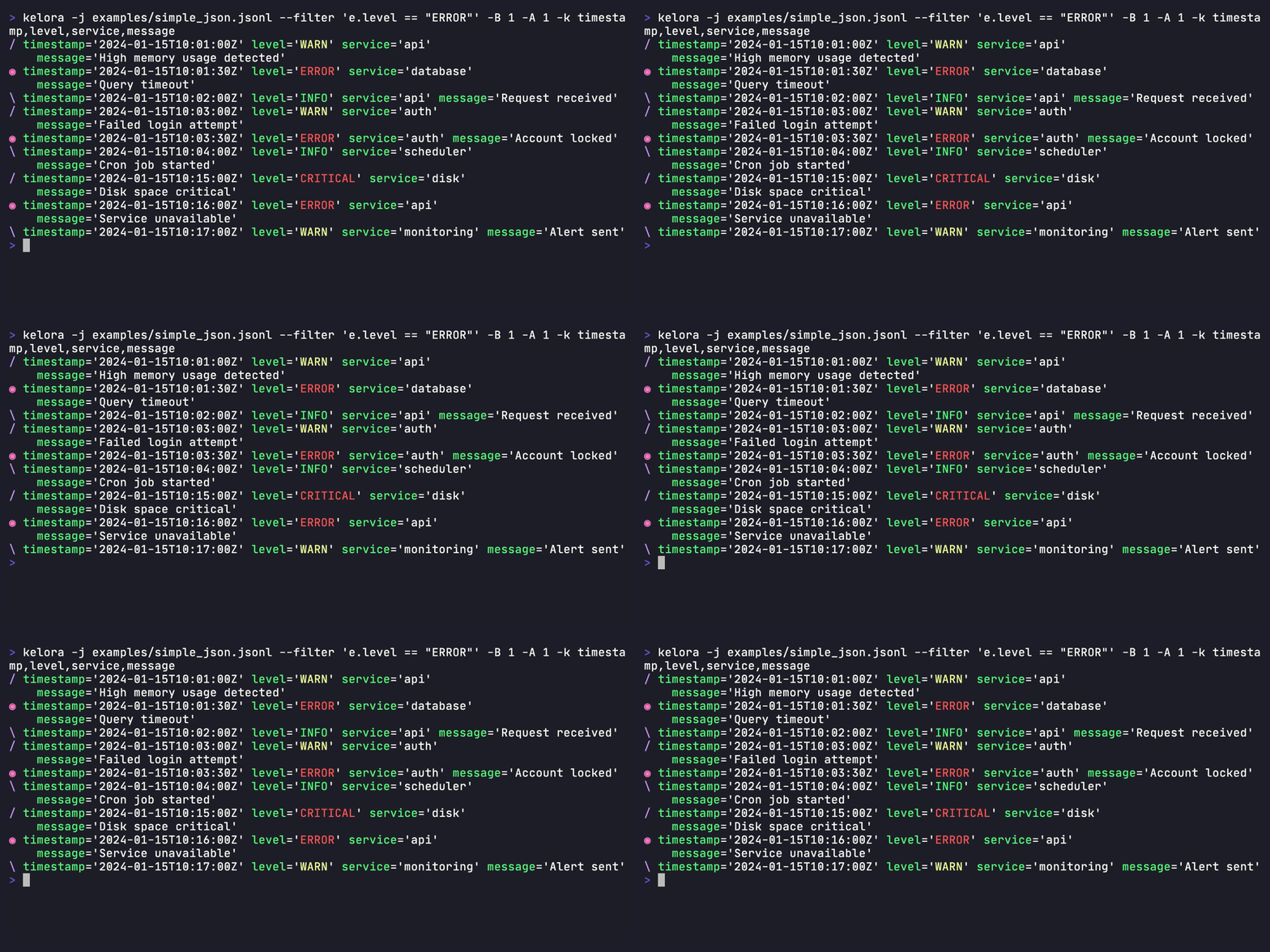
In the default output format each event carries a colored marker naming its role. Every event appears exactly once, with the marker that describes it:
◉   the match itself (* when color is off)
/   before-context — the run-up to a later match
\   after-context — trails an earlier match
|   both at once — between two matches whose windows overlap
Markers appear only in the default format; -F json/csv/logfmt emit the same
events unmarked. They are part of the event line on stdout, so the stderr
advisory switches (--no-warnings, --no-hints, --no-diagnostics) leave them
alone — -q and --silent suppress the events themselves.
What counts as a match. An event matches when it passes every filter in the pipeline's leading run of filters, so both of these mean "context around events passing both conditions":
kelora -j --filter 'e.status >= 500' --filter 'e.host == "web-1"' -C 2 app.log
kelora -j --filter 'e.msg.contains("timeout")' --levels error -C 2 app.log
The context lines that run selects are neighbours of a match, not matches
themselves, so a filter placed after an --exec or --assert does not
re-judge them. Such a filter can drop matches while their context lines remain,
so kelora warns when one is there; keep the filters together to avoid it.
--since/--until stay outside the run: they define which events exist at all,
so context is drawn from inside the time window rather than across its edges.
Context requires sequential mode — --parallel is ignored with a warning, since
batching would reorder the neighbours that define the markers.
Output Options
Output Format
-F, --output-format <FORMAT>
Output format. Default: default
Values:
default- Key-value format with colorsjson- JSON lines (one object per line)logfmt- Key-value pairs (logfmt format)inspect- Debug format with type informationlevelmap- Grouped by log levelkeymap- Shows first character of specified field (requires--keyswith exactly one field)tailmap- Visualizes numeric field distribution with percentile thresholds (requires--keyswith exactly one numeric field)csv- CSV with headertsv- Tab-separated values with headercsvnh- CSV without headertsvnh- TSV without header
kelora -j -F json app.log
kelora -j -F csv app.log
kelora -F keymap -k status app.log
kelora -F tailmap -k response_time api.log
kelora -j --stats app.log
--legend / --no-legend
Control the data-driven legend appended to map outputs (levelmap, keymap,
tailmap). The legend decodes each glyph back to the source values that produced
it, e.g. E = ERROR | I = INFO | W = WARN or 2 = 200,204 | 4 = 404.
By default the legend appears only when output is an interactive terminal, so piped/redirected output stays clean.
--legend- always append the legend (even when piped)--no-legend- never append the legend
kelora -F levelmap app.log              # legend shown on a terminal, omitted when piped
kelora -F levelmap --legend app.log | less   # force the legend through a pipe
kelora -F tailmap -k latency --no-legend app.log > map.txt  # suppress it
-J
Shortcut for -F json.
Output Destination
-o, --output-file <FILE>
Write formatted events to file instead of stdout.
Core Fields
-c, --core
Output only core fields (timestamp, level, message).
Default Format Options
These options only affect the default formatter (-F default).
Brief Mode
-b, --brief
Output only field values (omit field names).
Nested Structures
--expand-nested
Expand nested structures (maps/arrays) with indentation.
Word Wrapping
Word-wrapping applies only to the default output format. By default it is
auto: wide events wrap onto indented continuation lines when stdout is a
terminal, but piped or redirected output stays one line per event (so wc -l
and other line-oriented tools count events correctly).
--wrap
Always wrap, even when piped or redirected.
--no-wrap
Never wrap; keep each event on a single line.
kelora app.log | less        # wraps in the terminal? no — piped, so single-line
kelora --wrap app.log | less # force wrapping into the pager
kelora --no-wrap app.log     # never wrap, even in a terminal
To make wrapping-through-pipes your default, add --wrap to the defaults
line in your .kelora.ini.
Timestamp Display
-z, --show-ts-local
Display timestamps as local RFC3339 (ISO 8601 compatible). Display-only - only affects default formatter output.
-Z, --show-ts-utc
Display timestamps as UTC RFC3339 (ISO 8601 compatible). Display-only - only affects default formatter output.
Display Options
Colors
--force-color / --no-color
Force colored output always, or disable it completely. By default, Kelora auto-detects color support based on TTY status and the NO_COLOR/FORCE_COLOR environment variables.
kelora -j --force-color app.log > output.txt   # Force color even when piping
kelora -j --no-color app.log                   # Disable colors
Note: When both flags are present, the last one wins. This allows overriding config file defaults.
Gap Markers
--mark-gaps <DURATION>
Insert centered marker when time delta between events exceeds duration.
kelora -j --mark-gaps 30s app.log    # Mark 30+ second gaps
kelora -j --mark-gaps 5m app.log     # Mark 5+ minute gaps
Visual Example:
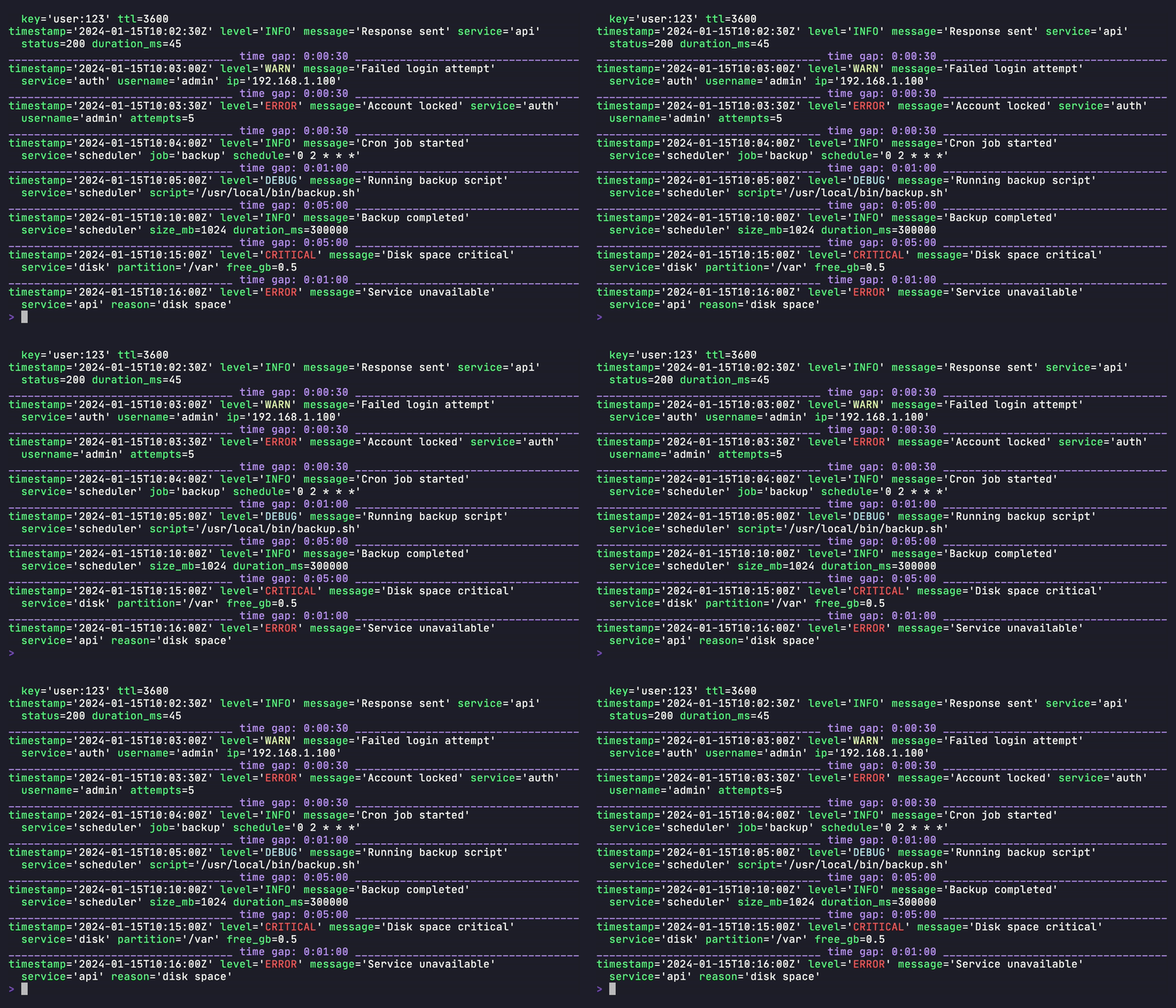
Gap markers help identify time discontinuities in your logs, making it easier to spot service restarts, network issues, or other temporal anomalies.
Emoji
--force-emoji / --no-emoji
Force emoji prefixes always, or disable them completely. By default, Kelora auto-detects emoji support based on color settings and the NO_EMOJI environment variable.
kelora -j --force-emoji app.log    # Force emoji even in NO_EMOJI env
kelora -j --no-emoji app.log       # Disable emoji
Note: When both flags are present, the last one wins. This allows overriding config file defaults. Emoji requires color to be enabled.
Performance Options
Parallel Processing
--parallel
Enable parallel processing across multiple cores. Higher throughput, may reorder output.
--no-parallel
Disable parallel processing explicitly (sequential mode is default).
--threads <N>
Number of worker threads for parallel processing. Default: 0 (auto-detect cores).
--batch-size <N>
Batch size for parallel processing. Larger batches improve throughput but increase memory usage.
--batch-timeout <MS>
Flush partially full batches after idle period (milliseconds). Lower values reduce latency; higher values improve throughput.
Default: 200ms
--unordered
Disable ordered output for maximum parallel performance.
Metrics and Statistics
Statistics
-s, --stats[=FORMAT]
Show stats only (implies -q/--quiet). Use -s for default table format, or --stats=FORMAT for explicit format.
Formats: table, json
--with-stats
Show stats alongside events (rare case).
--no-stats
Disable processing statistics explicitly (default: off).
Tracked Metrics
-m, --metrics[=FORMAT]
Show metrics only (implies -q/--quiet). Bare -m auto-selects the format like ls: the human-readable table on a terminal, the tsv record stream when stdout is piped or redirected. Use --metrics=FORMAT to force one.
Formats: short (first 5 items), full, tsv, json
tsv emits one tab-separated metric<TAB>key<TAB>value record per line, sorted by count/score descending — so --freq url | head is top-N and | tail is bottom-N. The three-column shape is fixed (scalars use an empty key column), and floats keep full precision (the table rounds for display; tsv/json do not).
kelora -j --exec 'track_freq("service", e.service)' -m app.log               # Auto: table on a TTY, tsv when piped
kelora -j --exec 'track_freq("service", e.service)' --metrics=full app.log   # Force the table even through a pipe
kelora -j --exec 'track_freq("service", e.service)' --metrics=tsv app.log    # Force the record stream even to a TTY
kelora -j --exec 'track_freq("service", e.service)' --metrics=short app.log  # Abbreviated (first 5)
kelora -j --exec 'track_freq("service", e.service)' --metrics=json app.log   # JSON format
--with-metrics
Show metrics alongside events (rare case).
--no-metrics
Disable tracked metrics explicitly (default: off).
--metrics-file <FILE>
Persist metrics map to disk as JSON.
Template Discovery
--drain[=FORMAT]
Summarize log templates using Drain (summary-only). Requires --keys with exactly one field.
Sequential mode only (not supported with --parallel).
For manual or lightweight bucketing, normalized() can pre-normalize a field in Rhai before output or tracking.
Formats:
table(default) - Clean output: count + templatefull- Adds line ranges, template IDs, and sample messagesid- Stable output: template_id + template (sorted by ID)json- Complete metadata for programmatic use
Default token filters normalize: ipv4_port, ipv4, ipv6, email, url, fqdn, uuid, mac,
md5, sha1, sha256, path, oauth, hexcolor, version, hexnum, duration,
timestamp, date, time, num.
function exists but is off by default: it replaced the identifier along
with the parentheses, so Intel(R) Xeon(TM) CPU mined as <function> <function>
CPU, Received SNMP packet(s) as Received SNMP <function>, and
pam_unix(sshd:auth) and pam_unix(sshd:session) collapsed into one template.
Whatever varies inside the parentheses is already covered by num, path and
friends. Opt back in with
drain_template(msg, #{filters: ["%{KELORA_FUNCTION:function}", ...]}).
timestamp also covers calendar dates spanning several tokens — ctime/asctime
(Mon Jun 13 03:55:15 2005, with or without the year) and the bare syslog form
(Jun 13 03:55:15) — so one message doesn't split into a template per weekday.
Sizes with units mask as one <size_kb>-style token however they were spelled
(18.4 KB, 10MB), and spaced durations (took 5 seconds) as <duration>.
Only the matched span is masked, so the literal part of a token survives:
uid=0 → uid=<num>, worker-3 → worker-<num>, GET /api/v1/users?id=5 →
GET <path>?id=<num>. A digit inside a word belongs to the word and is left
alone, so ssh2, utf8 and sha256 stay as they are. Templates that differ
only in how many tokens a value spans (an optional (1.13 KB) segment,
lifetime 00:03 vs lifetime <1 sec) merge at end of input, with <*>
covering the varying stretch.
What no filter catches, Drain itself generalizes: a position the events in one
template disagree on is shown as <*> (session closed for user <*>), with
--drain=full's sample: giving a real line for the concrete value.
How lines are grouped. Messages are bucketed by token count, then routed on
their first two tokens, then matched against the templates already in that bucket
— a line joins the closest one when at least 80% of its positions match exactly,
and starts a new template otherwise. At end of input, templates that differ in a
single position are merged when the evidence says that position holds a value
rather than a keyword, so a message split across many names (Invalid user admin
…, … oracle …) reports once as Invalid user <*> from <ipv4>. A merge that
would leave a template with no literal text of its own is refused, so distinct
event names are never collapsed into <*> <num>.
Two consequences worth knowing. A message whose early tokens vary can still
split, and the fix is the mined field rather than a flag: --exec the varying
prefix away, or mine a narrower field. And very short messages (three or four
tokens) rarely generalize, because one varying token out of three is too little
agreement to be sure two lines are the same message.
These settings are not exposed as CLI flags. They were chosen by measuring all
16 loghub _2k datasets against their
ground truth (just drain-accuracy); drain_template() in Rhai takes depth and
similarity for the rare log that needs different ones.
The model is bounded at 10,000 templates. A field varied enough to exceed that gets a warning (🔸) saying counts are incomplete — the answer there is to normalize the field, not to mine more of it.
# Default table format
kelora -j app.log --drain -k message

# With line numbers and samples
kelora -j app.log --drain=full -k message

# Stable ID list for diffs
kelora -j app.log --drain=id -k message

# JSON output
kelora -j app.log --drain=json -k message
--drain-diff[=FORMAT]
Compare template frequencies between a baseline and a target log — which templates are new, which are gone, and which changed rate. The first question in every incident and deploy verification: what changed?
Requires --keys with exactly one field (the field to mine, same semantics as
--drain). Summary-only; sequential mode only (not supported with --parallel).
Three ways to define baseline and target:
# Two inputs: first is baseline, second is target
kelora --drain-diff old.log new.log -k msg

# One input, split at a timestamp: everything before the cut is baseline
kelora --drain-diff --cut-at 2026-07-24T14:00Z incident.log -k msg

# One input, split at the first match: no timestamp needed
kelora --drain-diff --cut-before 'e.msg.contains("deploy started")' incident.log -k msg
Formats:
table- Diff-style rows plus a footer. The default on a terminal.full- The same rows, each followed by indented detail: template id, the counts and shares the compact row leaves out, and a sample of a real line.tsv- One tab-separated record per changed template, no header and no surrounding report. The default when stdout is piped or redirected.json- One JSON object withnew,gone,freq_changed, the unchanged tally, per-side totals, spans, and the exclusion counts (excluded_no_field,excluded_no_timestamp)
A bare --drain-diff picks between table and tsv the way -m and
--span-summary do: the report on a terminal, the record stream when stdout is
piped or redirected. --drain-diff=table forces the report through a pipe.
Reading the report. It is shaped like a unified diff, because that is what it is — a diff of which message templates occur and how often:
--- deploy_before.jsonl  110 events  2025-01-20T13:30:00Z .. 2025-01-20T13:56:10Z
+++ deploy_after.jsonl   120 events  2025-01-20T14:00:00Z .. 2025-01-20T14:24:20Z

  +        3  config reloaded with <num> stale keys
  +        2  worker <num> restarted after heartbeat timeout <duration>
  -        8  connection pool recycled for <fqdn>
  * 14x more  upstream <fqdn> returned <num> for request <uuid>

2 templates unchanged in frequency | field: msg
| meaning | annotation | |
|---|---|---|
--- / +++ |
the baseline and the target, with each side's event count and observed span | |
+ |
a template only the target has | its event count in the target |
- |
a template only the baseline had | its event count in the baseline |
* |
a template both logs have, at a materially different rate | the rate change, as a plain multiple |
The header lines are the report's provenance: in one-input mode they name the
split rule (incident.log before 2026-07-24T14:00:00Z) rather than just the
file, because "before the cut" and "from the cut" are not filenames. Spans are
printed in the form --cut-at accepts back, so a first attempt that misses
doubles as the lookup for the next one.
It cannot see rewording. A message changing from "timeout after 5s" to
"timed out after 5s" is one - plus one +, never a modified template — *
means the same template at a different rate, nothing else.
How it works. Both sides are mined through a single shared drain instance (so the template set is joint), then every distinct field value is re-matched against the frozen final template set and counted per side. Because raw counts mislead when the sides differ in size (10 minutes of incident vs. 24 hours of baseline), all comparisons use share — count divided by that side's total events.
A * row's multiple is computed from the shares, not the raw counts (30/2
would say 15× above, but the target side is bigger, so its lines are cheaper).
It is also the number two percentages would not hand you: subtracting 1.8% from
25.0% is something your eye does for free, dividing them is not.
There are no threshold flags by design. Templates with a combined count below
2 are ignored, and + templates are exempt from that floor — a template
appearing even once only after the deploy is exactly what you are looking for.
A * row is reported when the change is too big to be chance at those event
counts, and big enough to matter: at least 0.5 points of that side's
traffic, or a 1.5× change in the template's rate. Both bars are needed — the
first keeps one event on a 20-event side out of the report, the second keeps
out changes that are real but too small to act on.
Everything else is this diff's context lines: templates whose frequency did not meaningfully change, tallied in the footer rather than printed. "Unchanged" is a slight simplification — some of them did move, just not by enough to call — so when one moved by a point of traffic or more the report says so rather than leaving you to wonder where it went:
2 templates unchanged in frequency | field: msg
2 of them changed a little, but 110 and 120 events are too few to tell that from random variation
Rows are sorted so your eye does the thresholding: counts descending within +
and -, and * rows by how much of the side's traffic moved, so a template
that tripled from 0.01% to 0.03% sorts below one that took over a quarter of
the log.
Templates are truncated to the terminal width rather than wrapped, so the
marker and annotation columns stay aligned. An explicit COLUMNS is honored
even when the output is redirected; otherwise a redirect lays out at 200
columns. --no-emoji swaps the Unicode punctuation (…, ×) for ASCII.
--drain-diff=full mirrors --drain=full: the same rows,
each followed by the detail a one-line row has no room for.
* 14x more  upstream <fqdn> returned <num> for request <uuid>
     id: v1:95dadd630a7f7097
     baseline: 2 events (1.8%)  ->  target: 30 events (25.0%)
     sample: "upstream payments.svc.cluster.local returned 503 for request 1a2b0c4d-…"
Three things the compact row omits. The id is the join key --drain=id
prints, so a template can be followed across runs and modes. The counts and
shares are both sides — for a * row this is where the multiple's inputs
appear, so 25.0 / 1.8 ≈ 14 can be checked rather than taken on trust; a + or
- row shows only the side it exists on. The sample is a real line the
template matched, which is the first thing anyone wants after reading a
template, and it is the most frequent line on that side (with the text as
tie-break) so it is both representative and identical between two runs over the
same log. full prints templates untruncated, since it is about to print a
whole sample line under each one anyway.
Machine formats. tsv is one fixed nine-column record per changed template,
written verbatim so head/sort/awk see only data:
change is new, gone or freq_changed — the same three names the JSON
arrays use, and the same three things the table marks +, - and *. The side
a row is absent from carries a 0, z_score is empty for new/gone (they
are gated by the noise floor, not the z-test), and the template goes last
because it is the only free-form field — tabs and newlines inside it are
flattened to spaces so one record stays one line. Percentages are rounded to
four decimals.
# Only what appeared, biggest first
kelora --drain-diff=tsv old.log new.log -k msg | awk -F'\t' '$1=="new"' | sort -t$'\t' -k4,4nr

# Only rate changes that at least doubled
kelora --drain-diff=tsv old.log new.log -k msg | awk -F'\t' '$1=="freq_changed" && ($6/$5>=2 || $5/$6>=2)'
json carries the same samples as full, per side (target_sample on a new
entry, baseline_sample on a gone one, both on a freq_changed one). tsv
does not: a sample is free-form log text, and widening the record to hold it
would trade a fixed column count — the property that makes awk positions
reliable — for something json already provides.
Neither tsv nor json carries the header and footer, which hold no
per-template data; use json when the totals, spans and exclusion counts
matter. No format truncates: all three list every template that changed, the way
--drain lists every template it mined, so | head stays the caller's decision
rather than the tool's.
--drain-diff=json reports both views per freq_changed entry — delta_pp for
the share move and z_score for the test behind the first bar (signed to match
the direction) — plus freq_unchanged_moved and freq_unchanged_max_delta_pp,
so a consumer can reproduce the table's explanatory note rather than infer it.
Want a different cutoff than the built-in bars? Filter the machine formats downstream — including with kelora itself.
--drain-diff composes with the normal pipeline: --filter/--exec run
before the comparison, so you can diff only errors, or normalize a field first:
# Diff only error-level events
kelora --drain-diff old.log new.log -k msg --filter 'e.level == "ERROR"'

# Normalize custom tokens the built-in masking doesn't know, then diff
kelora --drain-diff old.log new.log -k msg --exec 'e.msg = e.msg.replace(e.order_id, "<order>")'
Vacuous comparisons are refused, not reported. An all-empty report ("no
template differences", 0 events) reads as a confident nothing changed,
so --drain-diff refuses to print one when the mined field never yielded a
value: if every event lacked the field named by -k — a typo, or a field that
only exists in a different log — the run fails with exit 1 and names the
nearest field it did see, instead of certifying a log as unchanged that was never
examined.
A one-sided split is refused the same way. When one side gets every event and
the other gets none, every template lands in + or - by construction, so
the report reads as a dramatic finding ("the service stopped doing everything")
when it only means the boundary missed. The run fails with exit 1 and the
message carries the resolved cut plus the span the input actually covers:
$ kelora --drain-diff --cut-at 1h incident.log -k msg
kelora: --drain-diff: --cut-at resolved to 2026-07-29T09:15:00Z, and all 230 compared
event(s) fall before it, so the target side is empty and the report would mark every
template gone rather than compare anything. The input spans
2026-07-24T13:30:00Z .. 2026-07-24T14:24:20Z, so pick a --cut-at inside that range.
Note that relative times resolve against the current time, not the log's — '1h'
means an hour ago, and a bare '14:00' means today.
The span is the actionable half: it is what a working --cut-at gets picked from, so
a first attempt that misses doubles as the lookup step. In two-input mode the same
refusal fires when one file contributes nothing (empty, or emptied by
--filter/--since).
Related, quieter cases stay non-fatal:
- Some events carry the field and some don't (normal in heterogeneous logs): a
warning reports how many events were excluded and how many were actually
compared.
--drain-diff=jsoncarries the same count inexcluded_no_field. - No events reached the comparison at all (empty input, or everything removed by
--filter/--since/--levels): the report still prints, with a warning that it reflects missing data rather than an unchanged log.
Under --silent the report and both warnings are suppressed as usual, but the
refusal still prints its one fatal line and exits 1 — with nothing else left,
the exit code must not read as a clean comparison.
Memory. Pass 2 buffers each distinct mined field value (not full events), capped at 1,000,000 unique values; logs are repetitive so legitimate inputs sit far below this. Exceeding the cap aborts the report with guidance — a field that unique cannot be templated meaningfully anyway. This design also makes stdin a first-class input (nothing is re-read).
Known limitations (documented, not solved):
- Rewording blindness. A reworded message ("timeout after 5s" → "timed out after 5s") reports as one vanished plus one new template. Technically correct, semantically noisy.
- Template quality = drain quality. Custom tokens the built-in masking does
not recognize (order IDs, SKUs) can split one logical template into several,
inflating the diff. Remedy: normalize the field with
--execupstream. - No sequence awareness. The diff compares template frequencies, not orderings or burst timing.
- One big change makes everything else look like it moved. Shares are slices of the same pie, so when one template jumps to a quarter of the traffic, every other slice shrinks even if its own rate held steady. Read a cluster of same-direction moves as one event, not several.
- Each template is judged on its own. On a log with hundreds of templates, one can clear the bar by luck. The size bar filters most of those out, but a borderline row on a very template-heavy log is worth a second look.
--cut-at <TIME>
Timestamp splitting a single --drain-diff input into baseline (before the
cut) and target (at/after). Accepts the same timestamp formats as
--since/--until (see --help-time). Events without a parseable timestamp
are excluded from the comparison and surfaced in a warning.
The cut resolves against the clock, not the log. Because --cut-at shares
--since's vocabulary, --cut-at 1h means "an hour before now" and a bare
--cut-at 14:00 means "today at 14:00" — neither is relative to the log's own
time range. On an archived or incident log both land outside the data entirely,
which is why a one-sided split is a hard error rather than a report (above). For
a historical log, give an absolute timestamp — or use
--cut-before / --cut-after, which
need no clock at all.
Every successful run states where the split landed, on the header line for each side, so the boundary is never something you have to verify separately:
--- incident.log before 2026-07-24T14:00:00Z  110 events  2026-07-24T13:30:00Z .. 2026-07-24T13:56:10Z
+++ incident.log from 2026-07-24T14:00:00Z  120 events  2026-07-24T14:00:00Z .. 2026-07-24T14:24:20Z
The spans are printed in the timestamp form --cut-at accepts back verbatim, so
they can be copied straight into a follow-up invocation. --drain-diff=json
carries the same information as baseline_span / target_span objects
({"first": ..., "last": ...}, or null when the events carried no parseable
timestamps). Two-input mode reports its spans too whenever the logs are
timestamped.
--cut-before <EXPR> / --cut-after <EXPR>
Boolean Rhai expression whose first match splits a single --drain-diff
input. The two flags differ only in where the cut is placed relative to the
matching event — the same distinction the
--section-* family draws:
| Flag | Cut placed | Matching event becomes |
|---|---|---|
--cut-before |
immediately before the match | the first target event |
--cut-after |
immediately after the match | the last baseline event |
Pick by what the marker means. A line that opens the new regime — a deploy
marker, the first error of an incident — takes --cut-before. A line that
closes the old one — deploy finished, migration complete, the last healthy
heartbeat — takes --cut-after.
# The marker starts the new regime
kelora --drain-diff --cut-before 'e.msg.contains("deploy started")' incident.log -k msg
kelora --drain-diff --cut-before 'e.status >= 500' access.log -k msg

# The marker ends the old one
kelora --drain-diff --cut-after 'e.msg.contains("deploy finished")' incident.log -k msg
kelora --drain-diff --cut-after 'e.phase == "warmup"' rollout.log -k msg
Use either when you know what the change looks like in the log but not when it happened — which is the common case in an incident. There is no timestamp to look up, no clock to reason about, and no need to check the log's time range first.
The boundary latches on the first match, so a predicate that keeps matching
(e.status >= 500 on a log full of errors) still splits the log exactly once. The
predicate is only evaluated until it matches, so the rest of the stream costs
nothing, and no events are held in memory — unlike a time-relative split, this
needs one bool of state.
Same expression syntax as --filter (see --help-rhai), and
-I/--include helpers are available. Mutually exclusive with each other and
with --cut-at.
The predicate sees the event as the pipeline leaves it. --filter and
--exec run before the split, so a field your script creates is fair game:
kelora --drain-diff --exec 'e.marker = e.msg.normalized()' \
  --cut-before 'e.marker == "deploy started: <version>"' incident.log -k msg
The flip side is that narrowing can move the boundary in a way --cut-at cannot:
a --filter or --levels that removes the marker event shifts the split to the
next match, or refuses the run if there is none. A timestamp boundary is absolute
and unaffected. If the marker is a different severity from the events you are
diffing, filter after mining instead — or widen the predicate.
Degenerate splits are refused rather than reported (exit 1), each with the
diagnosis that fits:
- The predicate never matched. The target side would be empty and every
template would read as
-. The error suggests trying the expression with--filterfirst. --cut-beforematched the very first event. The baseline side would be empty and every template would read as+— either the predicate is too broad, or the marker genuinely is the first event and--cut-afteris the right flag.--cut-aftermatched the last event. The predicate was right but nothing falls after the boundary, so the target is empty. Distinguished from "never matched", since the fix is different: compare against a later capture.
A split that leaves one event on a side — --cut-before matching the last
event, --cut-after matching the first — is warned about (🔸) rather than
refused, and the report still prints. Shares and z-scores compute on a
one-event side, so the report is well-formed; what it is not is informative,
because the other side's templates read as + or - rows for want of anything
to compare against. The warning names the shortfall and points at the spans on
the ---/+++ lines. The same warning covers a two-input run whose target file holds
one line, and a --cut-at that lands one event inside the range.
A predicate that fails to evaluate before it finds the boundary also fails the
run. This is stricter than --filter, where a per-event error drops just that
event: here the boundary is a single decision, so one failed evaluation leaves it
unknown and silently puts every later event on the baseline side.
Field Discovery
--discover[=FORMAT]
Profile observed fields across the stream: field names, inferred types, cardinality estimates, and sample values.
Nested maps and arrays are flattened into dotted paths up to 3 levels deep by default (e.g. user.name, user.roles[]);
use --discover-depth to change the limit (or pass 0 for unlimited).
Example values are drawn via reservoir sampling so rare distinct values surface even on long streams.
When deeper nesting is present, the table output adds an explicit note that flattening stopped at the depth cap,
and JSON output includes flatten_depth_limit and flatten_depth_capped.
Implies -q/--quiet (events are suppressed).
Sequential mode only (not supported with --parallel or thread overrides).
Formats:
table(default) - Human-readable summaryjson- Machine-readable output
-D, --discover-final[=FORMAT]
Profile final emitted fields instead of parsed input fields. Use this when you want to inspect the schema after filters and scripts have run.
Formats:
table(default) - Human-readable summaryjson- Machine-readable output
# Discover only fields that survive filtering/transforms
kelora -j app.log -D --filter 'e.level == "ERROR"'

# JSON output of final fields
kelora -j app.log -D=json --filter 'e.level == "ERROR"'
--discover-depth <N>
Maximum depth for flattening nested maps and arrays into dotted keys during field
discovery. Default is 3. Depth counts descents from the event root, so a.b.c
is depth 3. Use a higher value to inspect deeply nested JSON, 1 to see only
top-level fields, or 0 for unlimited depth.
# Descend up to 5 levels deep
kelora -j app.log --discover --discover-depth=5

# Top-level fields only
kelora -j app.log --discover --discover-depth=1

# Unlimited depth (flatten all the way down)
kelora -j app.log --discover --discover-depth=0
Configuration Options
Configuration File
Kelora uses a configuration file for defaults and aliases. See Configuration System for details.
-a, --alias <ALIAS>
Use alias from configuration file.
--config-file <FILE>
Specify custom configuration file path.
--show-config
Show current configuration with precedence information and exit.
--edit-config
Edit configuration file in default editor and exit.
--ignore-config
Ignore configuration file (use built-in defaults only).
--save-alias <NAME>
Save current command as alias to configuration file.
kelora -j --levels error --keys timestamp,message --save-alias errors
# Later use: kelora -a errors app.log
Exit Codes
Kelora uses standard Unix exit codes to indicate success or failure:
| Code | Meaning |
|---|---|
0 |
Success - no unrecovered processing failure occurred |
1 |
Processing errors (parse/assertion/file errors, strict-mode filter/exec errors) |
2 |
Usage errors (invalid flags, incompatible options, config errors) |
130 |
Interrupted (Ctrl+C / SIGINT) |
141 |
Broken pipe (SIGPIPE - normal in pipelines) |
143 |
Terminated (SIGTERM) |
For detailed information on exit codes, error handling modes, scripting patterns, and troubleshooting, see the Exit Codes Reference.
Environment Variables
Configuration
TZ- Default timezone for naive timestamps (overridden by--input-tz)
Rhai Scripts
Access environment variables in scripts using get_env():
Common Option Combinations
Error Analysis
# Find errors with context
kelora -j --levels error --context 2 app.log

# Count errors by service
kelora -j --levels error --exec 'track_freq("service", e.service)' --metrics app.log
Performance Analysis
# Find slow requests
kelora -f combined --filter 'e.request_time.to_float() > 1.0' nginx.log

# Track response time percentiles
kelora -f combined \
    --exec 'track_freq("latency", e.request_time.to_float() * 1000)' \
    --metrics nginx.log
Data Export
# Export to JSON
kelora -j -F json -o output.json app.log

# Export to CSV
kelora -j -F csv --keys timestamp,level,service,message -o report.csv app.log
Real-Time Monitoring
High-Performance Batch Processing
# Parallel processing with optimal batch size
kelora -j --parallel --batch-size 5000 --unordered large.log

# Compressed archives
kelora -j --parallel logs/*.log.gz
See Also
- Quickstart Guide - Get started in 5 minutes
- Function Reference - All 150+ built-in Rhai functions
- Pipeline Model - How processing stages work
- Configuration System - Configuration files and aliases